With over 1 million users worldwide, WhatsApp Messenger is a free and easy way to message. For a long period of time, this build for mobile phones makes life simpler and easier. Whether you are using group chats, voice-form chat mics or coordinating an event with several people involved, you may now have some common questions.
How many members can a WhatsApp group chat have?
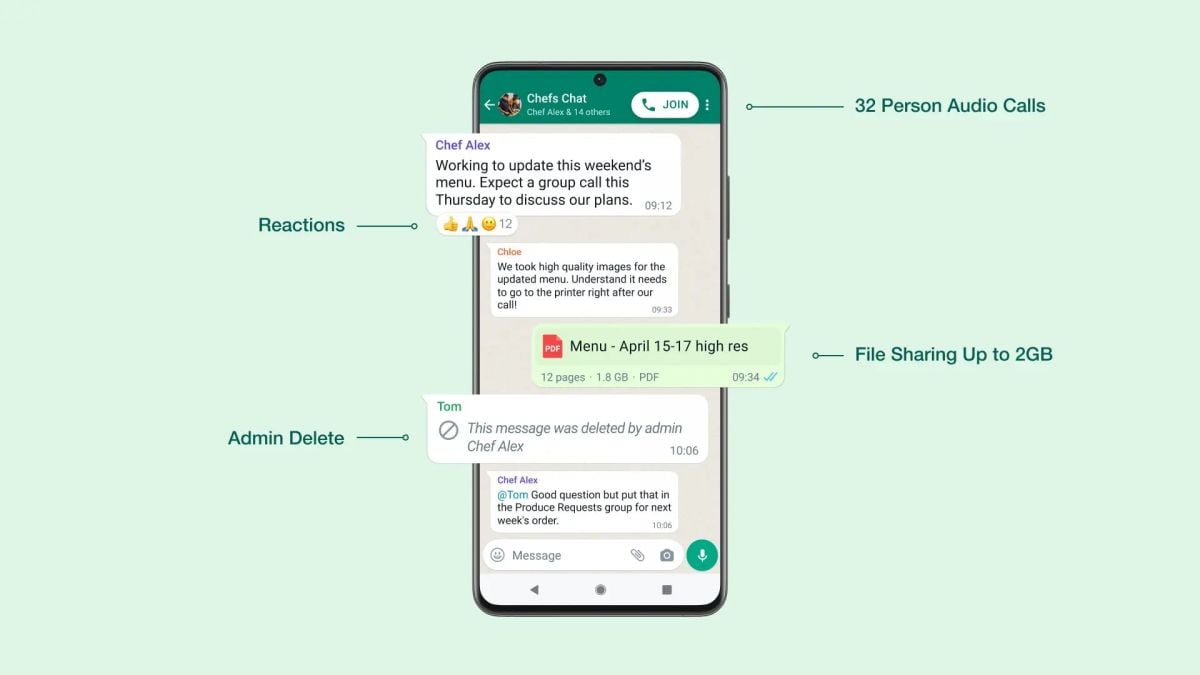
It allows group chats with up to 1,024 members in a single group, for both small circles and large communities. You can select contacts directly when setting up a group, or later invite them through links, QR codes, or SMS if they are not using WhatsApp. This capacity meets most of your daily professional and multi-person communication needs.
How to start a group chat and invite others to join?
Create a group: Tap "New Group" within the app, select yourself-what isn't up already on the displayed list of friends and few other contacts you'd like to add, give the group a name (up to 100 characters) and choose a profile picture. You can also produce an AI picture for the group icon on top of that. To invite others later go into the group information, tap "Add" and pick contacts or send out the group link/QR code. By default only admins can create links with this but the privilege might also be extended to all members of a group.
Can I manage group notifications so I don't get distracted?
Yes. It offers flexible notification settings for group chats. Go to the group information, select "Notifications" and then choose either "Priority Messages" for only receiving notifications about @mentions, answers to your messages, and messages from saved contacts; or set the phone to mute notifications 8 hours/24 hours/a week (ideal when you are both busy with frequent messages sent into this particular group or maybe carried to other such groups).
What is the group voice chat feature and how do I use it?
The Voice Chat feature is just a low-disturbance audio tool that just about any size of group can use. Let any group member start a voice chat by swiping up on the chat window and holding their finger on it; that conversation will be pinned at the bottom for ease of access. After opening the voice chat, other members receive a silent pop-up and can choose to come or go at any time without disturbing everyone else in chat. While in voice chat one can also input text messages, and all voice chats are end-to-end encrypted.
What should I do if a group has been labeled as "unreachable"?
Groups are labeled "unreachable" by WhatsApp if they violate the company's terms of service, such as carrying out spamming or for automation in any way at all. Only group admins can ask for a review: tap on the suspended group, select "Request Review via WhatsApp Support" in the pop-up that appears, and describe the circumstances. It may take up to 24 hours for reviews to be carried out, and a number of requests will not speed things up.
How to exit a group, delete a group chat?
To leave a group, go to group info and scroll down to the bottom and select "Exit Group." After exiting, you can remove the group from your chat list. Note that deleting a group only removes it from your device; people on the other end still have access. If you are the administrator resetting the group will not reset it for everyone—you must remove all members first or have them leave voluntarily.
Conclusion
WhatsApp's multi-party communication features are designed to be user-friendly and secure. By mastering these common questions, you can work and communicate with others efficiently, enjoy moments of group communication. For more details check the official help center at WhatsApp or app updates.