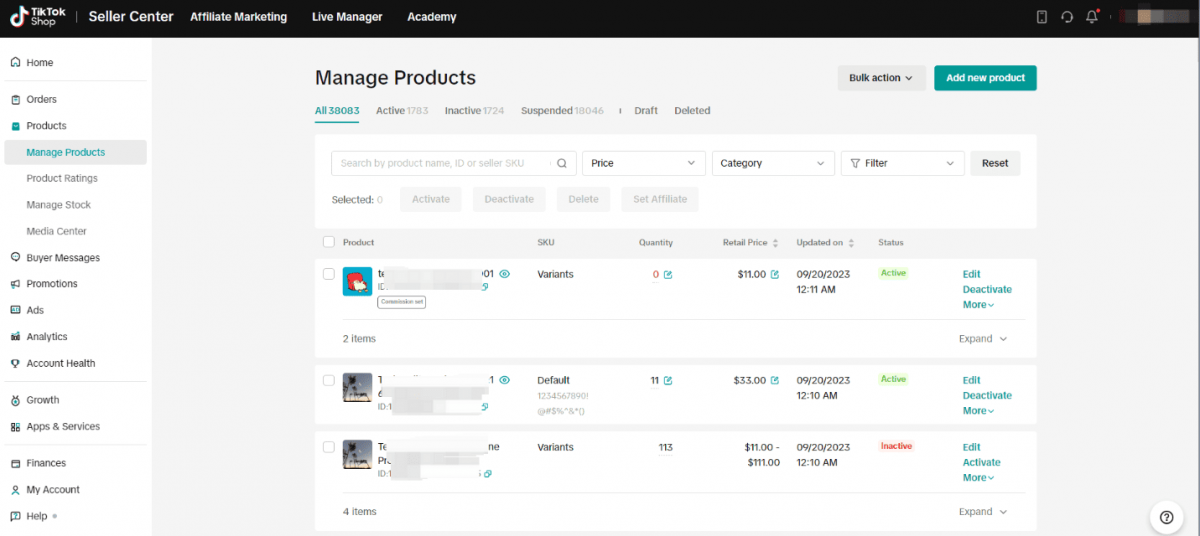
TikTok Shop Seller Center is the primary operational platform for merchants to manage their sales on TikTok Shop.
Am I qualified to apply for a seller account on TikTok Shop?
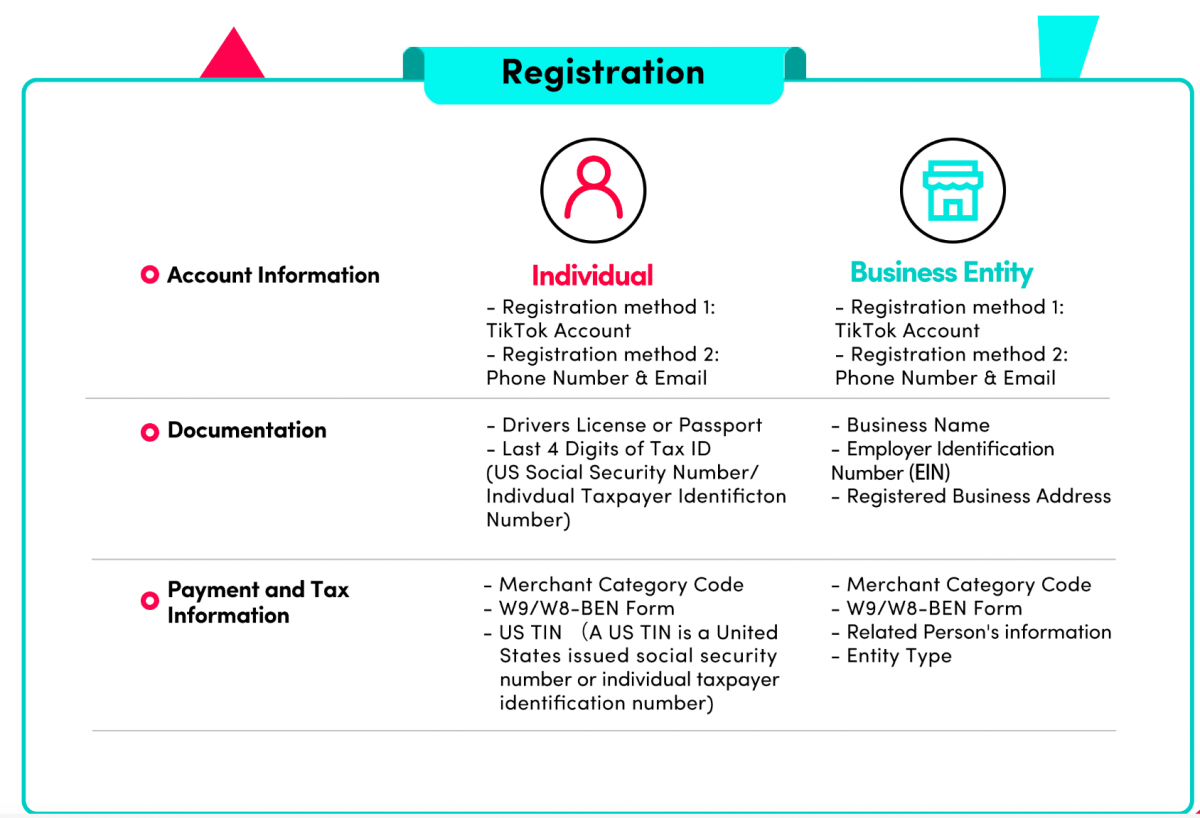
It is depending on the region of your market and the professional policies set by TikTok Shop. Generally, you need to be in a country or region where TikTok Shop has launched its official selling services (e.g. the UK, US, Southeast Asian countries). Confirmation will be given for providing valid business registration documents (requirements vary towards individual sellers as opposed to company entities), government-issued ID verification, and a settlement bank account in a qualified country. Always make sure to check the latest local regulations on TikTok's official merchant website before you apply.
What are the key stages to register and build my store?
1. Portal Access: Take yourself to the official TikTok Store seller registration website for your region.
2. Select Account Type: Determine whether you are going to register as an individual seller or a corporate entity, as this choice decides what types of documents you will need to turn in.
3. Submit Information and Documents: Enter your personal/business details, touch information, and where (if requested) to send returns; also take photographs to scan machine-readable copies of this essential paperwork.
4. Creating Your Store: When your seller account has been approved, you can visit the Seller Center to make arrangements for your store on the platform. Set up a store profile, add your first products (photos, descriptions, prices and quantities), settle payment and delivery, choose merchandise to put into inventory.
5. Go Live: Once your products are reviewed and approved, then you can start selling also by placing links in stories, or by going live.
How much can I expect to pay for fees or commissions?
There is no registration fee or store open fee for TikTok Shop. Yet the seller should be mindful of transaction-based fees: these mainly include a commission fee, calculated as a percent of the sale price (the proportions vary with product category) along with payment processing charges. Therefore, it's important to refer to the most recent seller fee structure on TikTok official help pages in your specific market, as rates and policies are subject to change.
How do I deal with orders, shipping, and customer service?
1. Orders & Shipping: All orders will appear on your Seller Center dashboard. You are responsible for arranging and transporting the goods promised to be shipped within their delivery period. Many sellers use approved third-party logistics providers to this end for practicality ' and economy.
2. Customer Service: When buyer inquires about orders, products, or returns, you are their first point of contact. The Seller Center has a messaging interface for direct communication between sellers and customers. So as to ensure timely, professional and helpful correspondence is important for achieving positive reviews and maintaining account health.
What are the most effective ways to succeed on TikTok Shop?
1. Content is Key: Do not simply only list your products. Film engaging and authentic short videos or Livestreams which display how your products are used in real life. It is a good idea to hook into current trends or fads and hit the ground running by participating in the challenges.
2. Use Built-in Tools: Features such as product links embedded directly in video clips, LIVE shopping panels, and promotional vouchers (coupons) or discounts which the Seller Center itself has created are active content sources. They drive traffic and turnover from your video straight to the store.
3. Analyze and Adapt: Be sure to enter the analytics area of your Seller Center regularly; from there you can determine not only who your potential audience is (i.e: age group demographic) but also which videos bring sales and store performance. With such insights at hand, refine strategy accordingly, both for content and products themselves.
Where can I find help or get more information?
For the most recent and detailed guidance, check out the TikTok Shop Seller Help Center, or click on 'Seller University' in your Seller Center dashboard. These two official channels offer a host of comprehensive features: articles, tutorials, policy updates for specific markets and regions, and general practical advice suitable to local conditions.
Through the Seller Center, merchants can handle product listings, orders, promotions, customer service, and analyze performance, all integrated seamlessly within the TikTok ecosystem.