Ghost Detector Real Life Radar
 5
5
Advertisement
Start Scanning
Position yourself within the region you want to scan; tap “Radar” to begin rotating 360°.
Find Targets
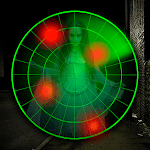
Red dots traveling toward the center indicate an area where a presence is suspected; tap a dot to open a camera view.
Record Anomalies
Turn on “Night Vision” or “EVP” to easily capture audio or visual anomalies using the flashlight icon.
Save or Share
Record evidence to the in-app journal, take notes, share screenshots or recordings with friends.






















Ad